Restaurant management system

Your whole restaurant in a single system

An online menu that is yours, a dining room with a table map, inventory that deducts itself and financials that close alongside. Start on the Free plan and stay there as long as you like.

Start free now
  • Free plan forever
  • 100% of the sale is yours
  • Cancel anytime
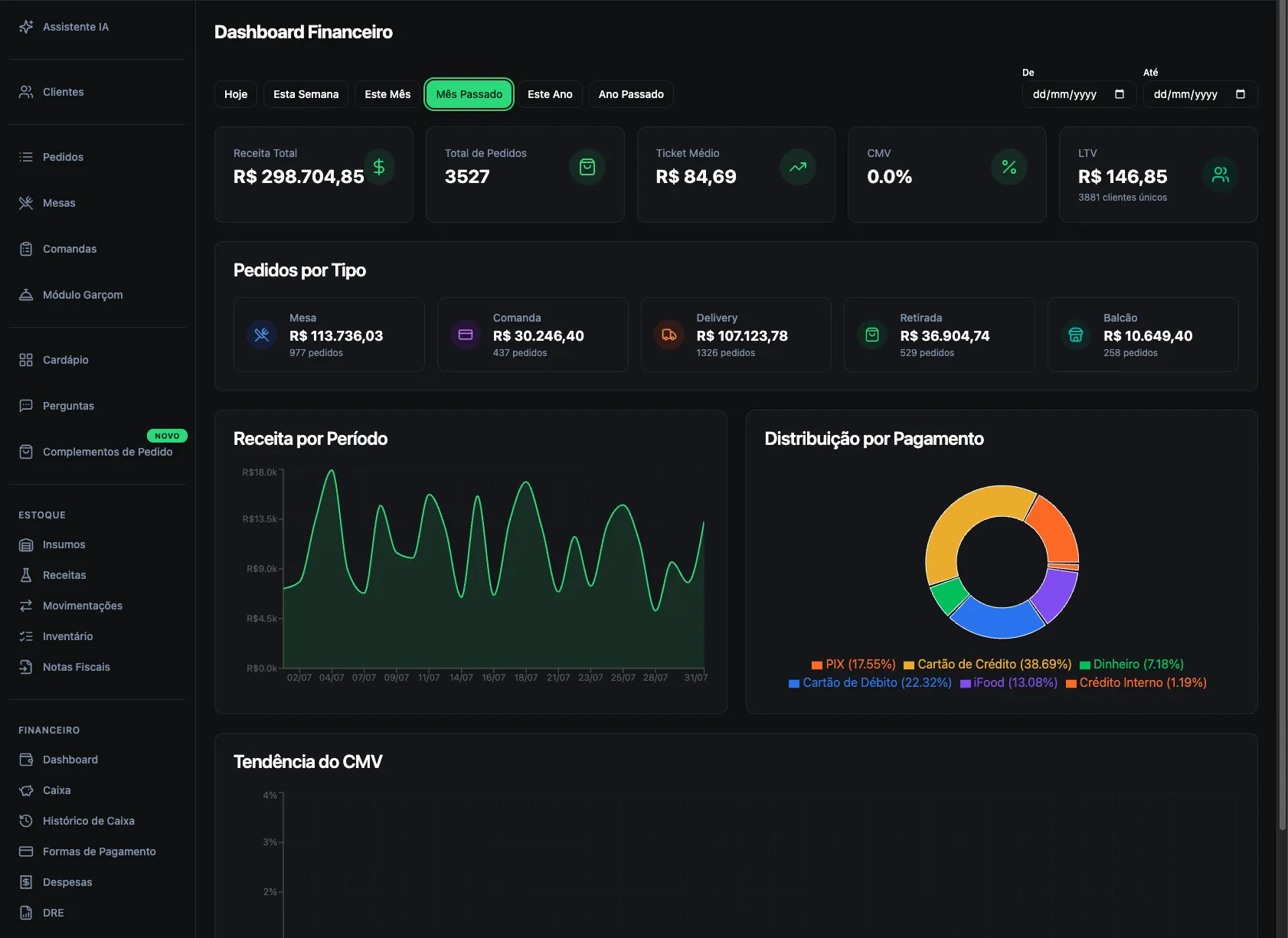
Aufisoft financial dashboard with revenue, average ticket and a day-by-day chart
Financial dashboard — available on the Free plan
Not modules

Menu, dining room, kitchen, inventory and financials are the same system.

Everything is connected from the start: the iFood sale lands in your COGS, the menu order deducts from inventory, and the cash close matches the income statement. Each piece of information is typed once.

OrderKitchenPrinting by stationInventoryCashInvoiceIncome statement
Who it's for

Three very different restaurants, the same system

from free up

Delivery and takeout

An ordering channel that is yours: your own link, the customer orders straight from the browser and 100% of the sale stays with you.

  • Takeout, delivery and counter
  • Delivery fee by area
  • Customer follows the order by link
from pro up

Restaurant with a dining room

The floor plan on screen, table by table, with a tab per seat and the server entering orders from a phone.

  • Table map you draw yourself
  • Individual tab per seat
  • Move items between tables
from free up

Pizzeria

Size, dough, crust and flavours — with the price coming out right even on a half-and-half of different values.

  • Flavour price per size
  • Highest-value or average rule
  • Dough and crust surcharges
Features

What the system does, screen by screen

Each block shows the plan a feature starts on. Everything accumulates: Pro has what Standard has, Full has what Pro has.

free

An online menu where 100% of the sale is yours

The customer opens a link, builds the order and checks out right there, straight from the browser. The order reaches the system instantly and the full amount stays with the restaurant.

  • It knows whether you're open — it respects your opening hours and says so when you're closed.
  • Takeout, delivery and counter — with address and delivery pricing by area.
  • Payment methods — the ones the restaurant accepts, including change for cash.
  • Coupon at checkout — creating campaigns starts on Pro.

This is on the Free plan. A restaurant can start from zero and begin taking orders through its own channel without paying anything. It's real use, for as long as you like.

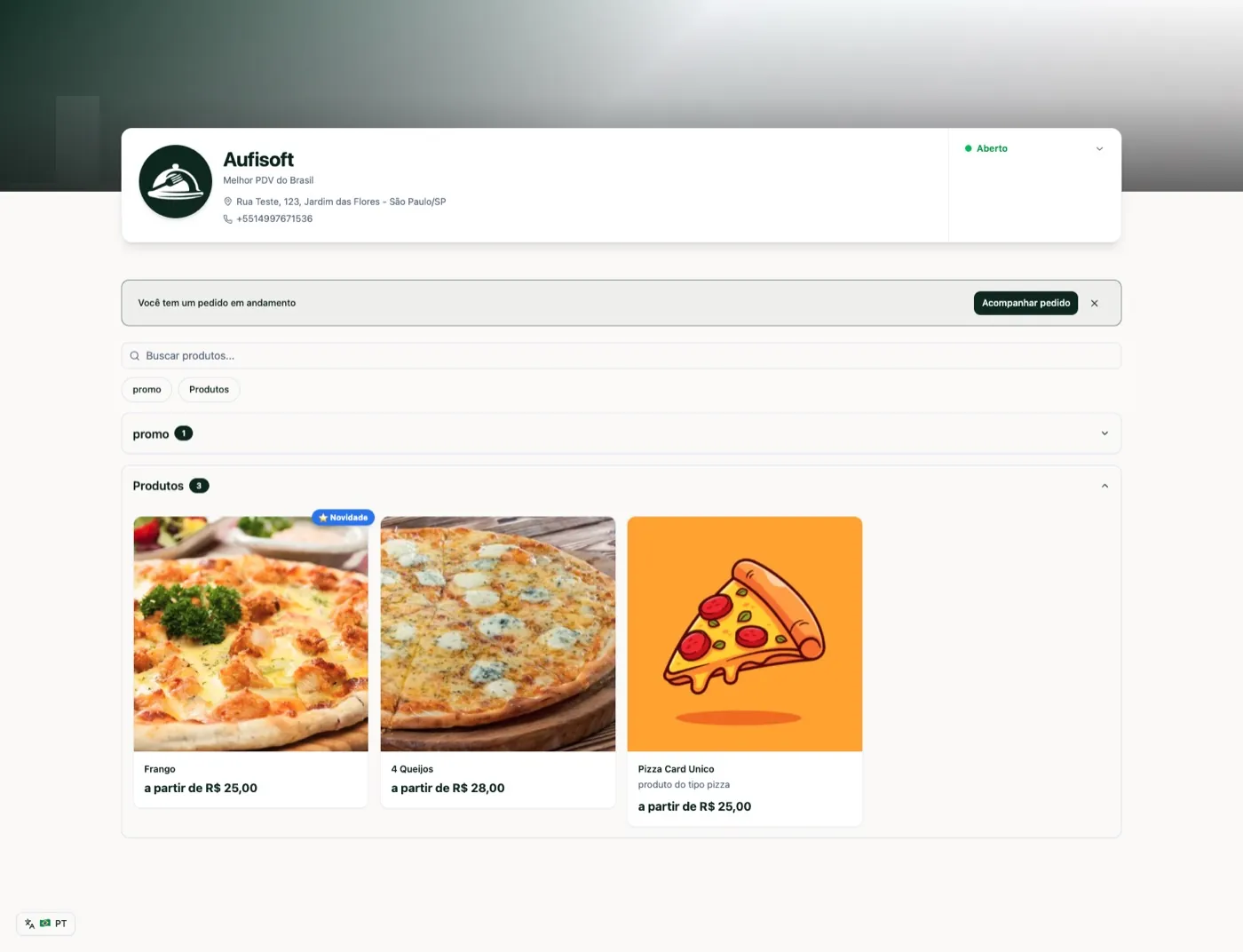
Aufisoft online menu from the customer's view, with cover, categories and products
The online menu, as the customer sees it
free

The menu understands what you sell

“Questions” are the choices that appear when a customer taps a product: size, how the meat is cooked, add-ons, sides. It's what separates a real menu from a price list.

  • Add-ons that add up — bacon, cheddar, double patty.
  • Free choices — how the meat is cooked, a note.
  • Items that are other products — reusing their photo, description and price.
  • Minimum, maximum and repeats — and what is required.

Pizza gets its own treatment. Each size allows a number of flavours, each flavour has a price per size, and the final price can be the priciest flavour or the average — you choose the rule.

A pizzeria catalogue in Aufisoft, with the questions configured on each product
The pizzeria catalogue — each product with its questions
free

The customer follows along on their own

From “received” to out for delivery, the customer follows everything on the order page itself — the same link they bought from. Every status change sends a notification to their phone.

  • Order timeline — sent, confirmed, being prepared, on the way, delivered.
  • A notification at every change — no need to keep watching the screen.
  • Summary and payment — items, total and PIX on the same page.
Order tracking page with status timeline and summary
Order tracking, on the customer's phone
free

A POS the team learns on the first order

Open an order, add an item, apply a discount, split the bill and close across several payment methods. The same screen for whoever works the counter and whoever types up a phone order.

  • Surcharge and discount — on the item or on the total.
  • Split the bill and add a person — the bill adds up correctly on its own.
  • Printing by station — each part of the order prints where it belongs: kitchen, bar, grill.
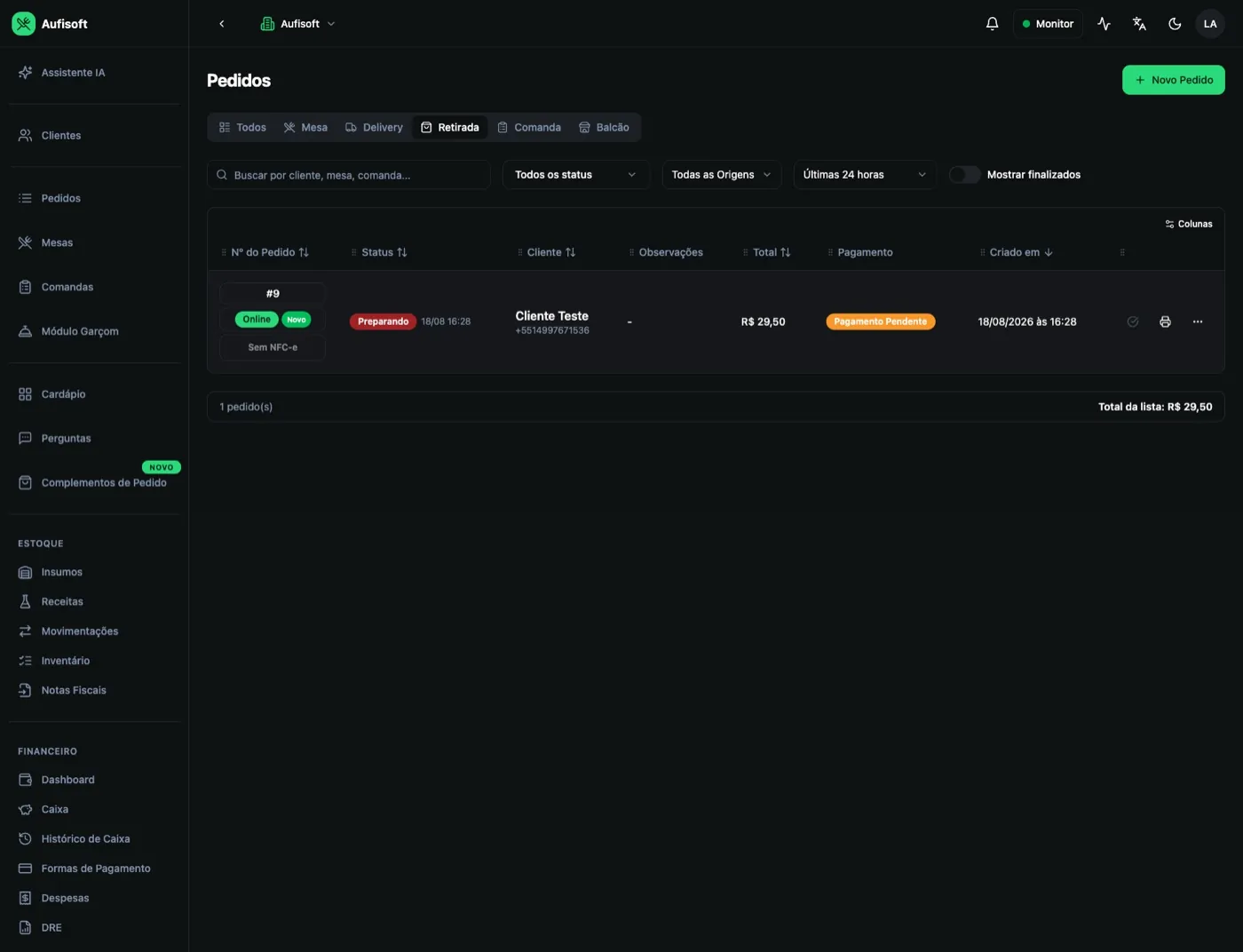
Aufisoft order list with filters for table, delivery, takeout, tab and counter
Every order in the same place
pro

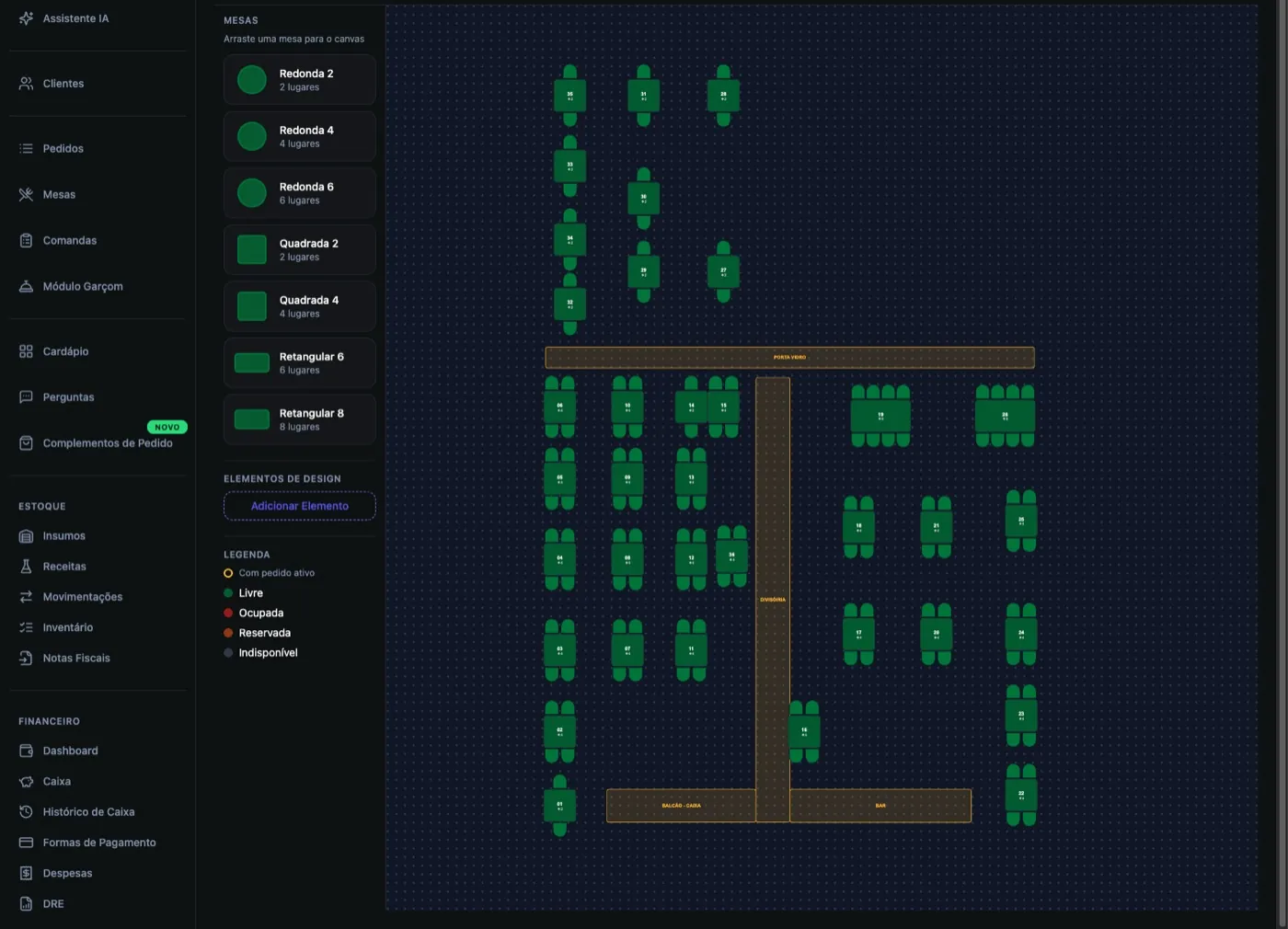
The dining room on screen, the way it really is

You draw your own floor plan: place the tables, choose shape and size, rotate them, and add a wall, counter or restroom to orient yourself. It ends up looking like the real place — anyone on the team gets it right away.

  • Each table's state — free, occupied, reserved.
  • A tab per seat — so splitting the bill isn't a mess at the end.
  • Server on the phone — enter it on the table or the tab and the order reaches the kitchen.
  • Move items — when the customer changes seats.

This is the feature that changes the product's category. Up to here the system serves delivery; from here on it serves a restaurant with a dining room.

Dining room table map with each table's state and the server module
Table map and server module
pro

From revenue to what's left

The dashboard answers “how much came in” — and it's on Free. The income statement answers “how much was left”: month by month across the year, with expenses already sorted into the groups that make sense for a restaurant.
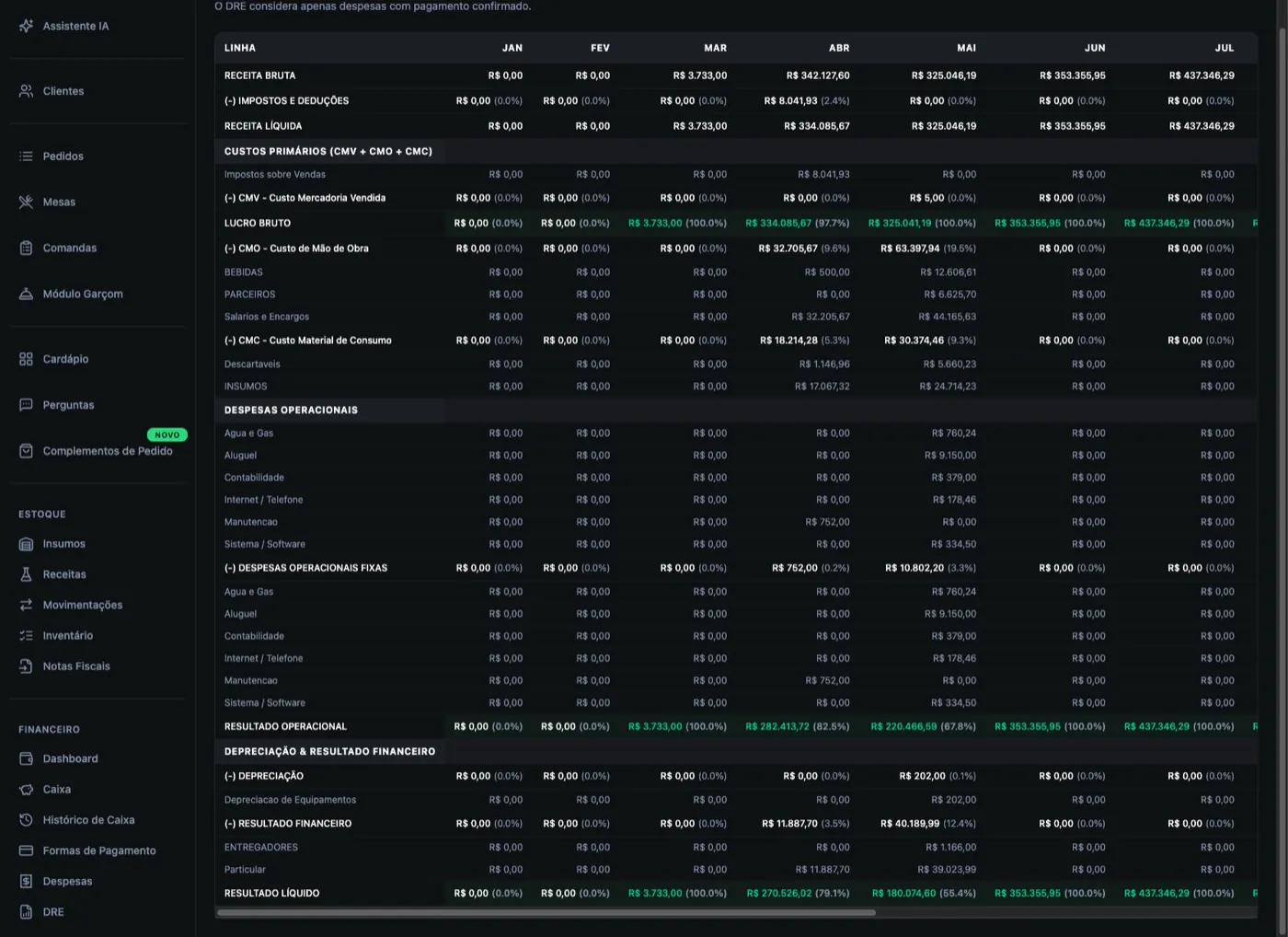
  • Labour cost — wages and payroll charges.
  • Consumables — packaging, disposables, gas.
  • Fixed operating — rent, water, power, internet.
  • Financial and taxes — card machine fees, interest, configurable tax rate.

The income statement builds itself. Every expense entered goes straight into the right group over the course of the month.

Income statement with the months of the year, expense groups and result
Income statement
full

Inventory moves on its own

You register your ingredients and build the recipe for each product — how much of each ingredient goes into each dish. From then on, selling deducts stock by itself.

  • Goods received from the invoice — the system fetches the supplier's e-invoice, reads the items and suggests which ingredient each one maps to. You check and confirm.
  • Recipe per size — for when consumption changes with the size.
  • Sub-preparations — the sauce that becomes an ingredient in several dishes is registered once.
  • Minimum stock and history — receipts, issues, adjustments and waste, all recorded.

The tedious part of inventory is entering receipts and deducting stock. The invoice handles the receipts, the sale handles the deductions.

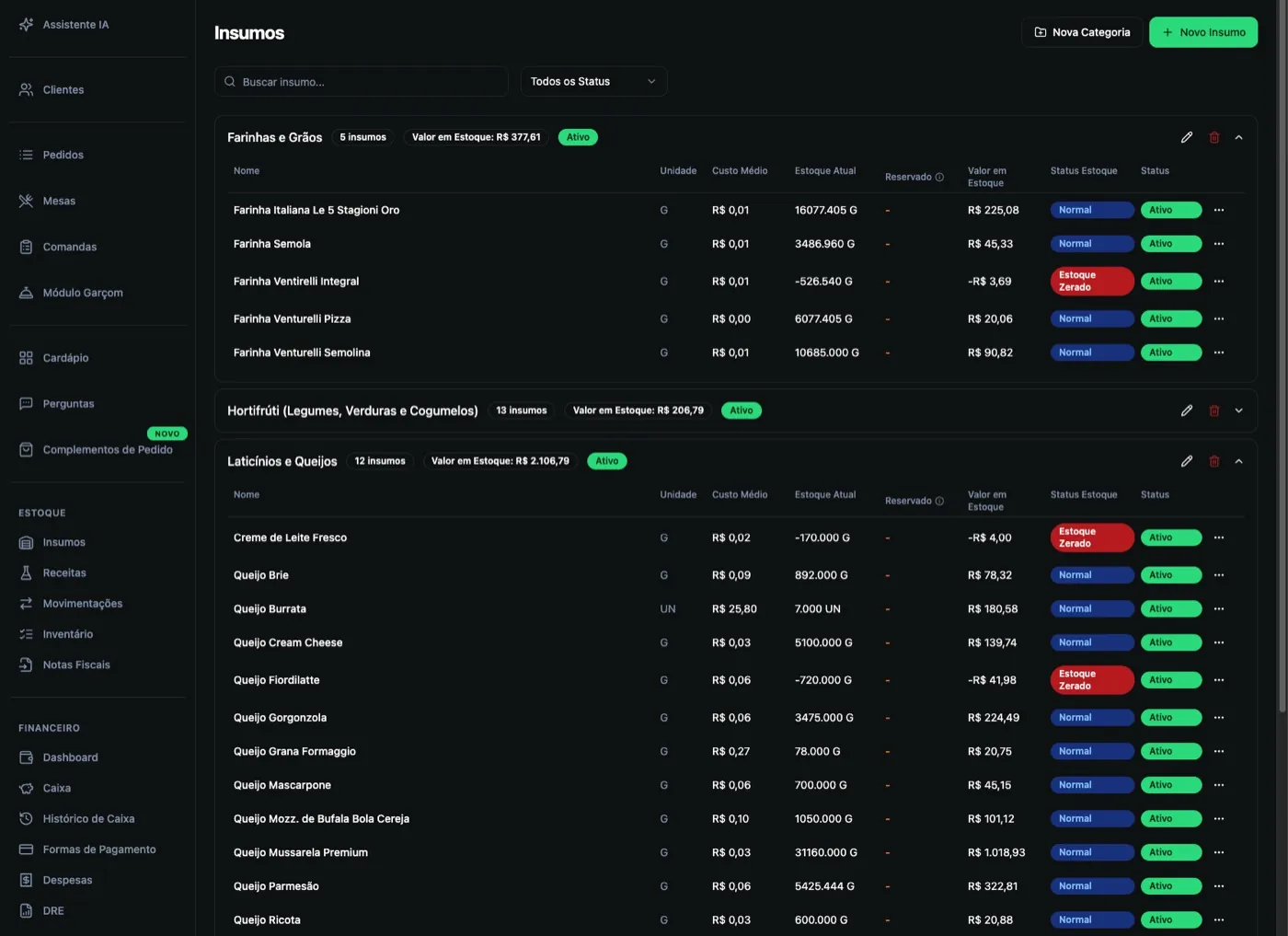
Inventory screen with ingredients, recipes and stock movements
Ingredients with average cost and current stock
pro

See everything that happens to orders

Every deletion and every removed item is recorded with a name, a time and a reason. It's real control, in the form every restaurant owner understands immediately.

  • Deleted orders — who deleted it, when and why. The reason is mandatory.
  • Products removed from orders — item by item, with quantity, value, who did it and when.
  • Best sellers — a ranking of products and of the most-chosen add-ons.

“Why do so many items disappear from orders on the night shift?” — the question the owner couldn't answer now has an answer in two clicks.

standard

And iFood comes in by itself

The order arrives in the same place as all the others and follows the same kitchen, printing and billing flow — typed once, at the usual counter.

  • Sync the catalogue without re-registering
  • Link each iFood product to the system's product
  • Check whether the connection is live

The iFood sale starts counting in revenue and inventory like any other.

And it all comes together

Small things that fix the day

Electronic invoicestandard

Tax invoices issued straight from the order.

Your own domainstandard

The menu at the restaurant's address, not a generic link.

Order bumpsstandard

A shelf of suggestions in the cart, once the customer has decided to buy.

Discount couponspro

Campaigns with a code, an expiry date and a usage limit.

All-you-can-eatpro

Per-person pricing, with table control.

AI chatfull

Ask the system about your own business and request catalogue changes.

COGS targetfull

Set your target cost and track the gap.

Users and permissionsall plans

Each employee with their own access and what they're allowed to do.

Pricing

Four plans. Each one includes the last.

Start on Free today and stay there as long as you like. When the restaurant grows, the plan grows with it.

to get started

Free

For those starting out, running takeout and delivery.

R$0/month

100 orders per month · 1 user

Includes:

  • Online menu
  • Full catalogue with questions
  • Takeout, delivery and counter orders
  • Financials and cash control
Create a free account

solves volume

Standard

For those already selling who need channel and volume.

R$49,90/month

Unlimited orders · extra user R$ 4.90

Everything in Free, plus:

  • Unlimited orders
  • iFood integration
  • Electronic invoicing
  • Your own domain on the menu
  • Order bumps
Subscribe to Standard

★ the category jump

Pro

For restaurants with a dining room: tables, tabs and servers.

R$99,90/month

Unlimited orders · extra user R$ 4.90

Everything in Standard, plus:

  • Table and tab orders
  • Server module
  • Income statement
  • WhatsApp integration
  • Discount coupons
  • Reports
  • All-you-can-eat setup
Subscribe to Pro

tightens the margin

Full

For those already running well who want to control cost.

R$149,90/month

Unlimited orders · extra user R$ 4.90

Everything in Pro, plus:

  • Complete inventory control
  • AI chat (monthly allowance, optional top-up)
  • COGS target
Subscribe to Full
Free is forever.Use the Free plan for as long as you like, always available, with the whole operation working.
Cancel anytime.No penalty: cancelling schedules the return to Free at the end of the cycle you've already paid for, and you keep everything until the last day.
Upgrades take effect immediately.Pro-rated: you pay only for the days left in the cycle. Downgrades take effect at the end of the cycle.
Extra user: R$ 4.90/month.Each with their own access and permissions. Users cannot be added on the Free plan.
Payment by credit card.Pick a plan, enter your card details and start using it. It's the only payment method accepted.
You choose the billing day.The 5th, 10th, 15th or 20th — the default is the 15th.
Comparison

Everything, side by side

FeatureFreeStandardProFull
Online menu
Catalogue with questions
Financials and cash control
Takeout, delivery and counter
Orders per month100unlimitedunlimitedunlimited
iFood integration
Electronic invoicing
Your own domain
Order bumps
Table and tab orders
Server module
Income statement
Discount coupons
Reports
All-you-can-eat setup
WhatsApp integration
Inventory control
AI chat (monthly allowance, optional top-up)
COGS target
Technical supportMon–Fri, 9am–6pmMon–Sat, 9am–6pmEvery day, 9am–6pm
Extra users (R$ 4.90)
Who uses it

Restaurants running on Aufisoft

A very good system and easy to use. What I liked most was the menu customisation — you can set everything up exactly the way the pizzeria works, and change prices and products very easily.

The iFood integration is very good too. And the AI is a real differentiator, especially for bulk changes and for help with inventory and the financial side.

Overall, it makes the day-to-day a lot easier

Lieve PizzeriaPizzeria · Ourinhos/SP

A simple, practical system, easy to use, with excellent support!

The iFood integration is exceptional and the online menu is super practical!

Our servers adapted incredibly well to the server module too

A LibanesaRestaurant · Ourinhos/SP
FAQ

Frequently asked questions

A restaurant management system that brings the online menu, POS, dining room, kitchen, inventory and financials together in one place. They aren't separate modules that have to talk to each other — it's a single system.

Start today, Free!

Create the account, build the menu and take your first order today. If the restaurant grows one day, the plan grows with it.

100 orders per month on the Free plan · 100% of the sale is yours · forever